Scrivener Alternative: 5 Best Options Compared in 2026
Scrivener is still the historical benchmark among novel-writing software: twenty years of development, a one-time $59.99 license, a depth of features built chapter by chapter over two decades of updates (Literature & Latte, 2026). But it's not the only option, and it never was: over the years, tools have popped up for people who write only on Mac, for people who want everything free, for people who need to format a book for Amazon KDP, and for people who (and this is the case for GrinTale) just want to open a browser and start writing right away, without installing anything.
This will be a comparison of 5 real alternatives, with prices and features verified at the source: GrinTale, Bibisco, Ulysses, Atticus, and yWriter.
In short
- GrinTale: €29/year, browser on any operating system, ready in 30 seconds, automatic cloud sync
- Bibisco: free (or $69 one-time for the full version), open source, desktop on Windows/Mac/Linux
- Ulysses: €39.99/year, Mac/iPad/iPhone only, minimal environment
- Atticus: $147 one-time, browser-based, built for laying out and publishing on KDP
- yWriter: free, Windows only (native), an interface stuck twenty years in the past
Why look for a Scrivener alternative
Scrivener does a lot well, and you notice it the moment you open it: a corkboard, a binder, word-count targets, a compile engine that can format for pretty much any publishing destination. The problem isn't quality, it's how much of all that you actually need.
Three recurring reasons push writers to look elsewhere:
Per-platform pricing. The license costs $59.99 for macOS or Windows, but if you write on both, the bundle jumps to $95.98, and the iOS app costs another $23.99 on top (Literature & Latte, 2026).
The learning curve. The official manual runs past 500 pages. An independent review notes that most Scrivener users only ever touch a small part of what it offers, simply because the rest takes real time to learn (Kindlepreneur, Scrivener Review, 2026).
No browser access. Scrivener is an installed app: to write from a different computer, you have to install it again, and syncing between devices means setting up Dropbox by hand. There's no web version.
None of these three points makes Scrivener a bad tool. It just makes it the right tool for a specific kind of writer, not for everyone. The next sections help you figure out where you land.
What a good alternative needs to have
Before the comparison, it's worth pinning down what we're actually looking for when we say "Scrivener alternative," because not every tool on this list solves the same problem:
- A clear price, not buried in vaguely named plans
- An honest learning curve: how much time separates installation from your first written page
- Multi-device access, or at least a clean export for anyone working from more than one computer
- Real structure: chapters, scenes, organized characters, not just an empty text editor
- Language support, if writing (or reading a menu) in more than one language matters to you: how many languages the interface actually ships in, not just whether it happens to be in English
With those criteria in mind, here's the comparison.
The 5 Scrivener alternatives, at a glance
- Price: GrinTale €29/year, everything included · Bibisco free (Community) or $69 one-time (Supporters), +$29.99/year for mobile sync · Ulysses €39.99/year (or €5.99/month) · Atticus $147 one-time · yWriter free
- Platforms: GrinTale browser (Windows, Mac, Linux, tablets) · Bibisco Windows, Mac, Linux (desktop) · Ulysses Mac, iPad, iPhone only · Atticus browser (Windows, Mac, Linux, Chromebook) · yWriter native Windows, Linux via Wine
- Offline: GrinTale no, a connection is required · Bibisco yes, data stored locally · Ulysses yes, native apps · Atticus limited, some features need a connection · yWriter yes, fully local
- Sync: GrinTale automatic cloud, zero setup · Bibisco only with a separate subscription (Everywhere) · Ulysses automatic iCloud · Atticus automatic cloud in the background · yWriter none, not offered
- Languages: GrinTale 4 languages (English, Italian, French, German) · Bibisco ~13-15 languages, including English, Italian, French, German · Ulysses 12 languages, including English, Italian, French, German, Japanese, Korean · Atticus English only · yWriter English (native) + unofficial community translation files (confirmed: Italian, German)
- Learning curve: GrinTale minimal · Bibisco moderate, in-depth planning takes time to learn · Ulysses low · Atticus low, a bare-bones editor · yWriter moderate, dated interface
- Ideal for: GrinTale starting to write today, from any device · Bibisco planning your plot for free or open source · Ulysses writing only on Mac and iPhone · Atticus formatting and publishing on Amazon KDP · yWriter spending nothing, an old-school interface you don't mind
(Detailed sources for each entry are in the SOURCES section at the bottom of the page.)
GrinTale: writing without opening a manual
GrinTale starts from a simple observation: most people writing a novel use a small fraction of what Scrivener offers, and pay for that small fraction with weeks of ramp-up. GrinTale's promise is that less than 3 minutes pass between signing up and writing your first word, with nothing to install (GrinTale, 2026).
Zero configuration. Open your browser, log in, write. Saving is automatic, so is sync: you start on your laptop and pick up on your home computer without thinking about it. It also runs on Linux and tablets, where Scrivener doesn't reach.
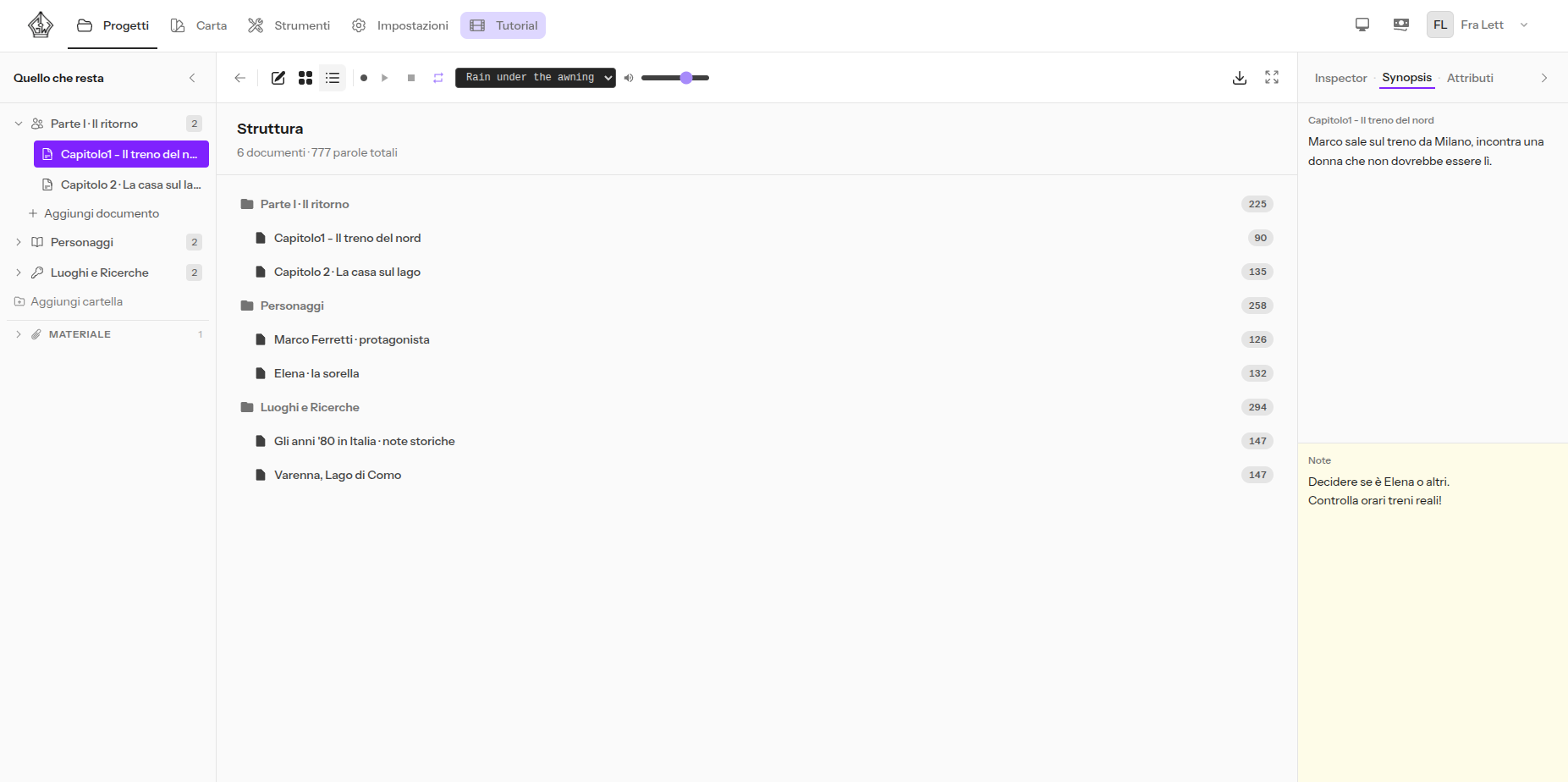
Project structure, without the manual
Chapters and folders live in the Binder, and you drag them to reorder. The Corkboard shows every document as a card with a synopsis and progress; the Outliner gives you the compact hierarchical view of the whole project. Nothing to learn upfront: what you see is what's there.
Characters, always within reach
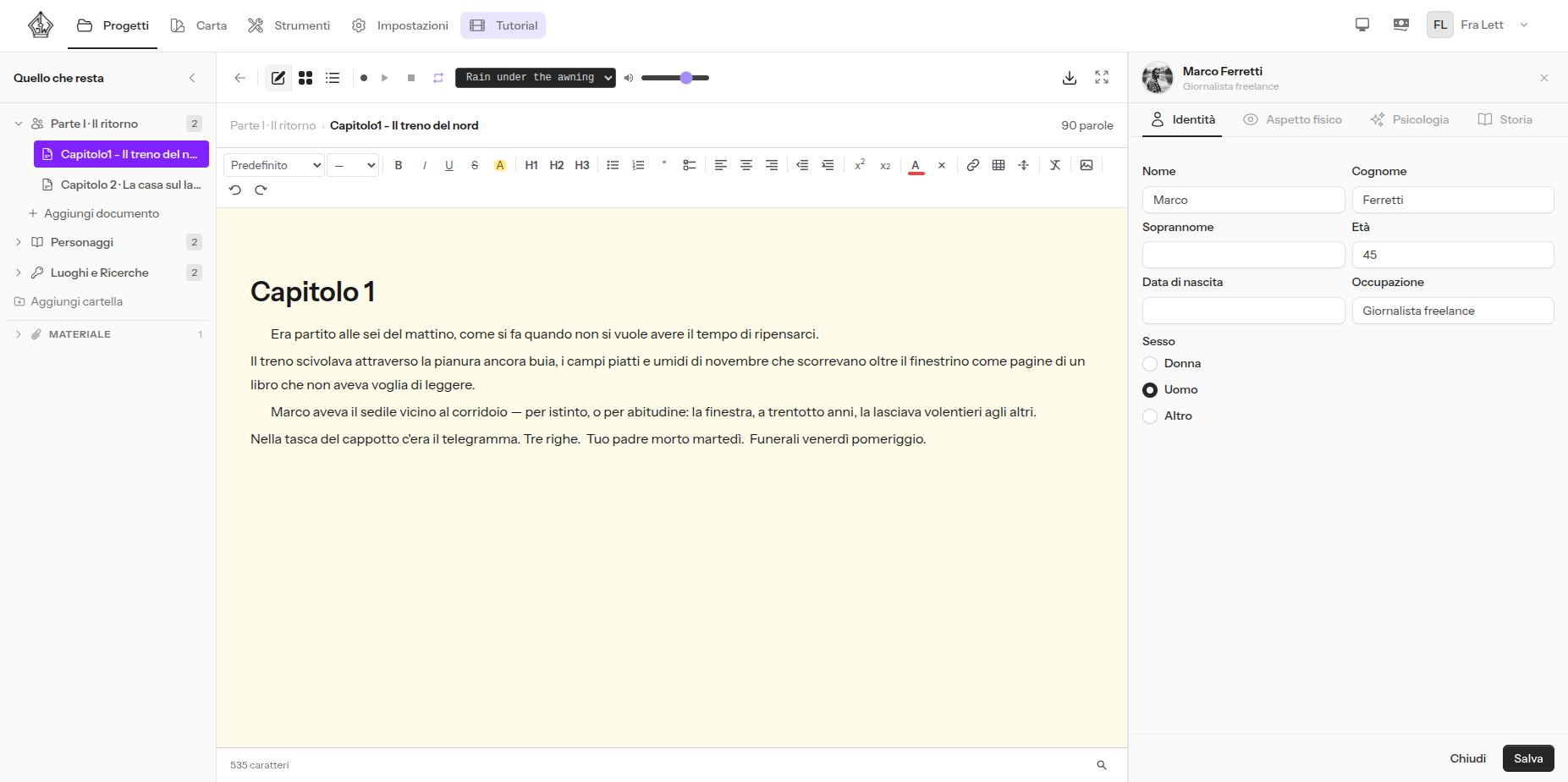
Every character gets a full sheet (identity, physical appearance, psychology, backstory, a photo) and stays visible next to the editor while you write, so you don't have to leave the chapter to remember the eye color of someone you just named.
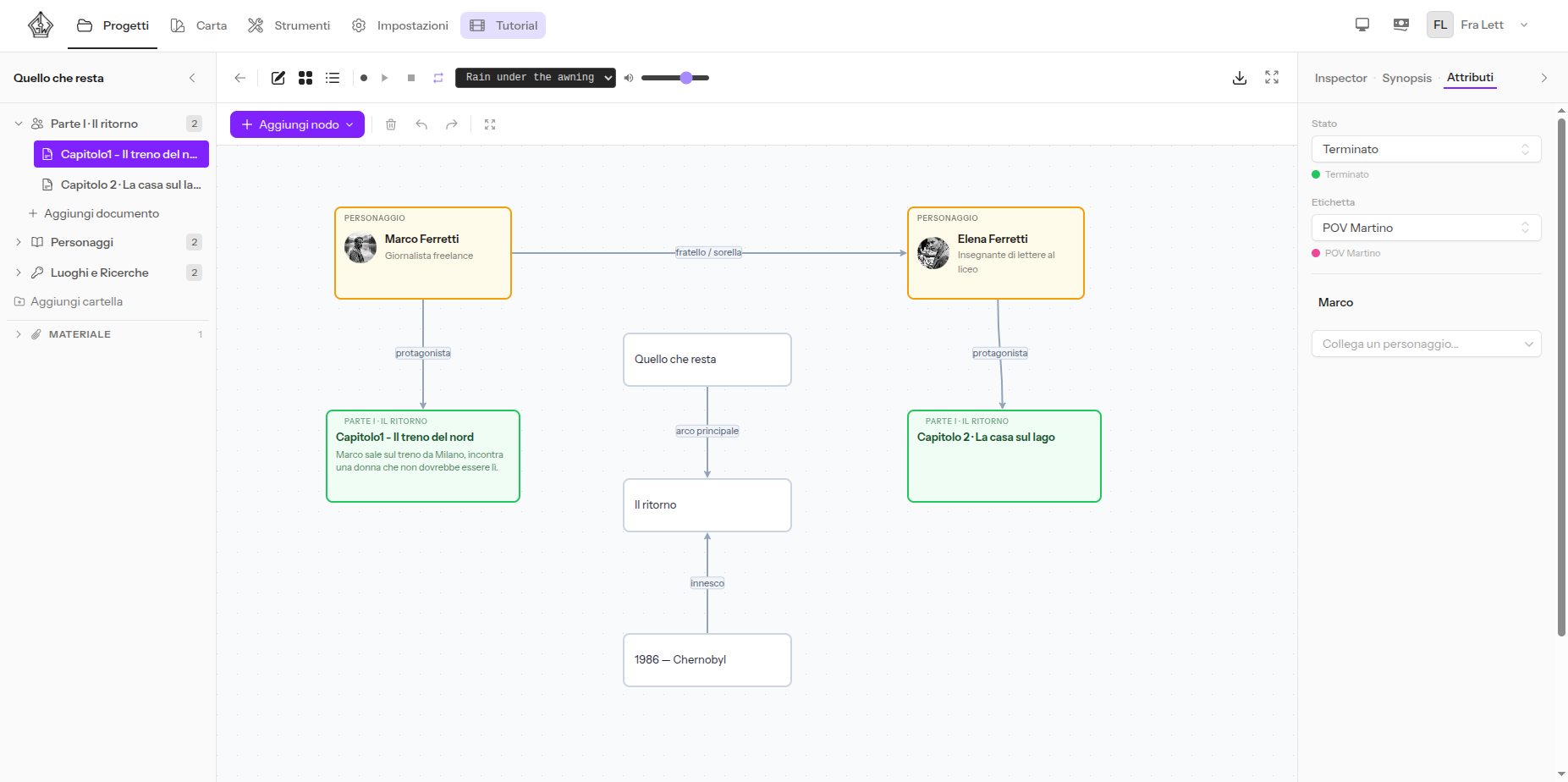
A map to keep your plot and characters together
Nodes, connections, chapters, and characters you can drag onto the same canvas: useful if you think in images before you think in sentences, without having to learn a separate mind-mapping tool.
Import built for people coming from Word or Google Docs
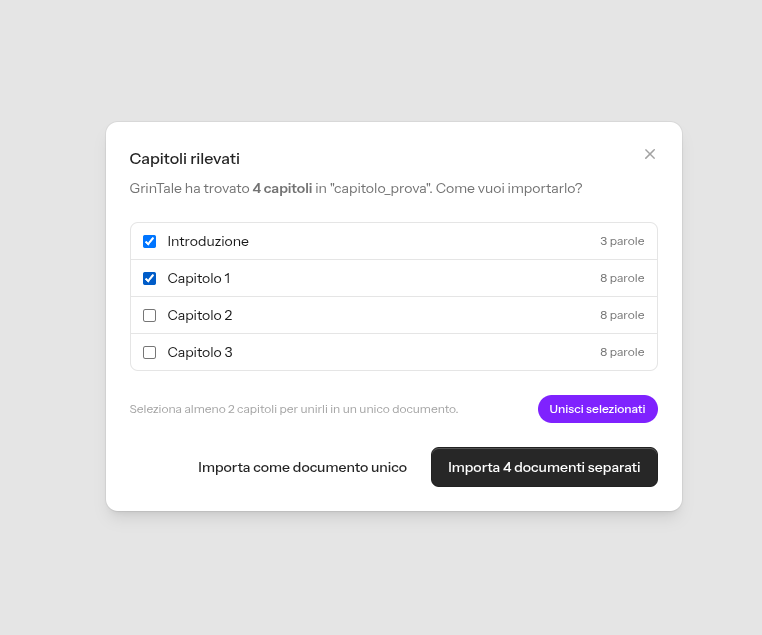
Upload your .docx and GrinTale detects the chapters on its own, showing you a preview before creating any document. You can even merge chapters that got split by mistake before you confirm. In Bibisco and yWriter, importing takes more manual structuring work; in Atticus, independent reviews note that chapter handling during import needs careful attention (Reedsy, Atticus Review, 2026). If your manuscript is already in Google Docs, moving it over takes a minute.
Everything else, in brief
- Built-in encyclopedia and dictionary, without leaving the editor
- Zen Mode: just you and the text, everything else disappears
- Snapshots: a picture of each document, so you can go back to an earlier version when a revision goes wrong
- Project materials: images, PDFs, and reference documents attached to the project
- Export to PDF (A4, A5, B5, Letter, customizable margins), DOCX, and EPUB, with chapter selection
- Interface in 4 languages: English, Italian, French, German
- Unlimited projects and storage, two-factor authentication, light and dark themes
The entry price
15 days free, no credit card, then, as a launch promotion, €29/year (about €2.40/month). To be fair, over the long run a one-time license can cost less: compared with Bibisco Supporters ($69 once) or Atticus ($147 once), after 2-3 years the GrinTale subscription passes the total upfront cost of those licenses. In exchange, the subscription always includes everything: every feature, present and future, cloud, updates, with never a separate upgrade fee.
The other 4 alternatives, one by one
Bibisco: the open-source planner
Bibisco started as open source and remains the alternative with the deepest plot-planning tools among the free options: character interviews, relationships, props, mind maps in the paid tier (Bibisco, 2026). The Community version is free with no project limits; the Supporters version costs $69 one-time and unlocks extra tools, with 2 years of updates included. It's available in English, along with more than a dozen other languages.
The catch is syncing: the desktop app (Windows, Mac, Linux) stores everything locally, and getting your novel onto your phone or tablet needs a separate subscription, Bibisco Everywhere, at $29.99/year (Bibisco, 2026). An independent review also flags a writing and export experience that feels less polished than newer tools (Kindlepreneur, Bibisco Review, 2026).
Pick it if you want a free or open-source plot organizer and don't need to reach your novel outside your computer.
Ulysses: minimalism for Mac and iPhone writers
Ulysses is built for people who write only on Mac, iPad, and iPhone, with a stripped-down environment and automatic sync via iCloud across your devices (Ulysses, 2026). The subscription costs €39.99/year (or €5.99/month); since 2017 there's no longer a one-time license, it's subscription-only now. It ships in 12 languages.
The trade-off is the platform: anyone who also writes on Windows or Android is locked out, and Ulysses has no visual plotting tools or self-publishing layout features (Reedsy, Ulysses Review, 2026).
Pick it if you write only on Mac and iPhone and want a clean environment, without needing to organize complex chapter structures.
Atticus: write and format for Amazon KDP in one tool
Atticus runs in the browser (Windows, Mac, Linux, and Chromebook) and combines writing with layout for publishing on Amazon KDP, with more than 17 ready-made templates (Atticus, 2026). It costs $147 one-time, no monthly fees.
Independent reviews do note a bare-bones writing editor, without advanced planning or revision tools (Reedsy, Atticus Review, 2026). Its own Help Center confirms the interface is English only, with some settings limited to English-language rules (Atticus Help Center, 2026).
Pick it if you've already written your novel elsewhere and mainly want a way to lay it out and publish it on KDP.
yWriter: free, bare-bones, from another decade
yWriter is free, built by a fellow writer (Simon Haynes) to track scenes and chapters, and runs entirely offline: no connection needed, all your data stays on your machine (Spacejock Software, yWriter7, 2026). It's available for Windows and, via Wine, for Linux; Mac and mobile versions exist but are built by third-party developers for a fee, not by the original author.
The interface looks like it's twenty years old: tab-based structure, no sync, no cloud. Community-contributed translation files exist for a handful of languages, including Italian and German, and Simon Haynes has folded at least one of these ("Deutsch II") into official beta releases himself. No French translation file appears to exist yet, though the developer publishes generic instructions for anyone who wants to build one from a template (Spacejock Software, Languages FAQ, 2026).
Pick it if you don't want to spend anything and a dated interface doesn't bother you.
How to switch from Scrivener to GrinTale without losing your work
If you decide to leave Scrivener for GrinTale, the path is direct: export your project from Scrivener as .docx (using Compile) and import it into GrinTale. Chapters are detected automatically, and you get a preview before you confirm anything. Character sheets and notes need to be recreated by hand, because the two internal formats aren't compatible.
Toward the other alternatives on this list, the path varies case by case: Bibisco and yWriter both require you to rebuild the structure by hand after importing a .docx; Ulysses imports plain text but not Scrivener's folder structure; Atticus, as already noted, needs careful attention during chapter import.
When it makes sense to stick with Scrivener
Stick with Scrivener, or choose it if you haven't yet, if you recognize yourself in at least one of these: you often write without a connection; you want to pay once for the current version, no subscription, knowing a future major upgrade would cost extra; you have advanced Compile needs (precise editorial formatting, agent submissions with specific requirements); you love tailoring your tool, and the time it takes to learn it feels like an investment to you, not a cost.
None of the 5 alternatives on this list replaces Scrivener on every one of these points at once. Each one borrows a piece of it.
Try free for 15 days. No credit card required.
If you decide to stay, the subscription costs, as a launch promotion, €29/year (about €2.40/month). Cancel anytime, from settings.
Frequently asked questions
How much does Scrivener cost in 2026?
The standard license costs $59.99 one-time for macOS or for Windows ($95.98 for the bundle with both), plus $23.99 for the iOS app (Literature & Latte, 2026). Upgrades to major versions have historically been paid. An educational discount of about 15% is available.
What's the cheapest Scrivener alternative?
Bibisco (Community version) and yWriter are both completely free. Bibisco has richer plot-planning tools but is desktop-only with no sync unless you pay for the Everywhere subscription; yWriter is more bare-bones but just as free and works offline. GrinTale isn't free, but it has a 15-day trial with no credit card, then, as a launch promotion, €29/year.
Is there a Scrivener alternative for people who write only on Mac and iPhone?
Yes, Ulysses is built for exactly that: a native environment on Mac, iPad, and iPhone with automatic sync via iCloud, at €39.99/year.
What's the best choice for formatting a book to publish on Amazon KDP?
Of the 5 alternatives on this list, Atticus is the one built specifically for this, with ready-made templates for KDP formatting. GrinTale exports to PDF, DOCX, and EPUB with customizable margins, but has no KDP-specific layout templates: if formatting for publication is your main priority, Atticus is still the more targeted choice.
Can I switch from Scrivener to GrinTale without losing my work?
Yes. You export your project from Scrivener as .docx (using Compile) and import it into GrinTale: chapters are detected automatically, and you see a preview before confirming anything. Character sheets and notes need to be recreated by hand, because the two internal formats aren't compatible with each other.
Are these tools available in languages other than English?
Yes, to varying degrees. GrinTale ships in 4 languages (English, Italian, French, German). Bibisco covers roughly 13-15 languages, including English, Italian, French, and German. Ulysses supports 12 languages, including English, Italian, French, German, Japanese, and Korean. Atticus is English only, confirmed directly by its own Help Center. yWriter's interface is English by default, with unofficial community-contributed translation files for a handful of languages, including Italian and German (Simon Haynes has folded at least one German file into official beta releases himself); no French file appears to exist yet, though the developer publishes instructions for building one.
Does GrinTale work offline like Scrivener, Bibisco, or yWriter?
No. Scrivener, Bibisco, and yWriter run entirely on your machine, no network required; GrinTale is a web app with automatic cloud saving, so it needs an internet connection. In exchange, you install nothing and pick up your work from any device, always up to date.
Do I have to pick just one alternative, or can I try more than one?
You can try as many as you like before deciding, it's the most honest way to find out which one disappears best under your fingers. GrinTale is the easiest to test in practice, since the trial runs in a browser and lasts 15 days with no credit card; the others require an install (Bibisco, yWriter), an Apple device (Ulysses), or a one-time purchase before your first real session (Atticus). For anything else about GrinTale, including the more technical questions, there's the full FAQ.
In summary
Five tools, five different philosophies. Scrivener remains the most complete toolbox for anyone who wants to configure every detail and doesn't mind the time it takes to learn it. Bibisco brings that same deep-planning philosophy to a free, open-source package. Ulysses strips it down to the essentials, but only inside the Apple world. Atticus focuses on one problem, formatting for KDP, and solves it well. yWriter is the choice for anyone who doesn't want to spend a cent and doesn't fear a dated interface.
GrinTale puts its own effort elsewhere: structure, characters, word-count goals, and a mind map ready to use, in a browser, with nothing to install, on any operating system. None of the 5 is the objectively right choice: it depends on where you write, with whom, and how much time you want to spend setting up your tool before you write your first word. If you want to try ours, 15 days of GrinTale won't cost you anything, not even a card number.
SOURCES
- Literature & Latte, "Buy Scrivener" (official prices and licenses), accessed 2026-07-17, https://www.literatureandlatte.com/store/scrivener
- Literature & Latte, "Scrivener FAQ" (trial terms: 30 days of actual use, non-consecutive), accessed 2026-07-17, https://www.literatureandlatte.com/scrivener/faqs
- Kindlepreneur, "Scrivener Review" (independent review: power and learning curve), accessed 2026-07-17, https://kindlepreneur.com/scrivener-review/
- GrinTale, features and pricing, accessed 2026-07-17, https://grintale.it
- bibisco, "Novel Writing Software | bibisco Download" (Community/Supporters/Everywhere pricing), accessed 2026-07-24, https://bibisco.com/novel-writing-software-download/
- bibisco, "Writer Software | bibisco FAQ" (supported languages), accessed 2026-07-24, https://bibisco.com/bibisco-faq/
- Kindlepreneur, "Bibisco Review: Read This Before You Purchase!", accessed 2026-07-24, https://kindlepreneur.com/bibisco-review/
- Ulysses, "Pricing", accessed 2026-07-24, https://ulysses.app/en/pricing/
- Reedsy, "Ulysses Review: Is It Worth The Money?", accessed 2026-07-24, https://reedsy.com/studio/resources/ulysses-writing-app-review/
- Atticus, homepage and pricing, accessed 2026-07-24, https://www.atticus.io/
- Reedsy, "Atticus Review: Is It Worth The Money?", accessed 2026-07-24, https://reedsy.com/studio/resources/atticus-review/
- Spacejock Software, "yWriter7", accessed 2026-07-24, https://spacejock.com/yWriter7.html
- Spacejock Software, "Languages FAQ", accessed 2026-07-24, https://spacejock.com/LanguagesFAQ.html
- Atticus Help Center, "Can I change the language used in the Atticus interface/menus?" (confirms English-only interface), accessed 2026-07-24, https://intercom.help/atticus-5877e36564df/en/articles/12677445-can-i-change-the-language-used-in-the-atticus-interface-menus
Pronto a scrivere il tuo prossimo capolavoro?
15 giorni gratis, nessuna carta richiesta.