The Best Software for Writing a Dissertation or Thesis (2026)
There is no single best program for writing a dissertation. There is the right one for your kind of dissertation: a law thesis with three hundred footnotes, an engineering thesis full of equations and a 60,000 word history dissertation need different tools. This guide compares the seven most used tools on what actually matters, and ends with the combination to choose for your field.
In brief
Microsoft Word is still what most supervisors and departments expect. The web version is free for students at eligible institutions (Microsoft).
LibreOffice Writer does almost everything Word does, free and open source (LibreOffice).
Google Docs is great for working with your supervisor, but its built in citation tool supports only MLA, APA and Chicago author date (Google).
LaTeX with Overleaf is the choice for dissertations with equations. The free plan allows one collaborator per project (Overleaf).
Scrivener and GrinTale help you build and organise a long dissertation, not format it.
Zotero does not write your dissertation, but it manages your references inside Word, LibreOffice and Google Docs, and it is free (Zotero).
What does dissertation software actually need to do?
Before choosing, be clear about what you need. A dissertation is not just a long document: it has specific requirements that a simple text editor does not handle. There are seven:
Footnotes numbered automatically, which renumber when you move a section. In law and the humanities there can be hundreds.
A reference list consistent with your department's style (Harvard, APA, OSCOLA, Chicago), which updates when you add a source.
An automatic table of contents built from your chapter headings, with the right page numbers.
Equations and symbols, essential in STEM and almost irrelevant elsewhere.
Working with your supervisor: comments, tracked changes, versions.
Final formatting that follows your university's rules: title page, margins, page numbering, binding requirements.
Organisation of a project that lasts months: chapters to move around, sources to find again, progress to measure.
No tool is best on all seven. That is why, in practice, people who write a good dissertation almost always use two: one to write and one for references.
Why is Microsoft Word still the standard?
Because it is the format your supervisor and your department expect to receive. Many universities provide their dissertation templates as .docx files, and many supervisors give feedback using tracked changes in Word.
Word covers almost every requirement well: footnotes, an automatic table of contents from heading styles, captions and an equation editor. It also has a built in citation and bibliography tool on the References tab, which builds your reference list from the chosen style (Microsoft, Create a bibliography). For an undergraduate dissertation with a few dozen sources it can be enough. For anything bigger, pair it with Zotero.
What it costs. Microsoft gives the Office 365 A1 plan free to students and educators at eligible institutions with a valid school email. The plan includes the web versions of Word, Excel and PowerPoint, not the full desktop apps (Microsoft Education). Many universities provide the full Microsoft 365 licence to their students anyway: check your IT services page before paying for anything.
The real limit. Word gets slow and fragile on very long documents with many images, and a single 200 page file is hard to reorganise. Moving section 3.2 into chapter 4 means cutting and pasting and hoping that footnotes and styles follow.
Is LibreOffice Writer a real free alternative?
Yes. LibreOffice is free and open source software (LibreOffice), and Writer does almost everything Word does for a dissertation: footnotes, an automatic table of contents, styles, captions and equations with the Math editor.
The thing to watch is compatibility. Writer opens and saves .docx files, but a complex dissertation passed back and forth between Writer and Word can lose some formatting, especially styles and numbering. The practical rule is to pick one program and stay with it to the end. If your supervisor works in Word, save in .docx and check the result in Word before every submission.
It is the right choice if you have no access to a Word licence or if you work on Linux.
Is Google Docs good enough for a dissertation?
It is good for writing and especially for working with your supervisor, less so for the final version.
Its strength is collaboration: you share the document, your supervisor comments directly on the text, and nobody swaps files called "dissertation_final_v3_revised". Version history is complete and saving is continuous.
The limits show up with sources. The built in citation tool supports three styles: MLA, APA and Chicago author date (Google, Add citations and a bibliography). There is no Harvard, which many UK universities use, and no footnote style such as OSCOLA or Chicago notes and bibliography. The fix is Zotero, which has a Google Docs integration too.
The other limit is final formatting: margins, the university title page and roman numerals for the front matter are easier to handle by exporting to .docx and finishing in Word or LibreOffice.
When is LaTeX with Overleaf worth it?
When your dissertation is full of equations, or when your department already uses it. In mathematics, physics, engineering and computer science LaTeX is the de facto standard: equations come out typographically correct, references are handled with BibTeX or BibLaTeX, and the numbering of chapters, figures and cross references is always right.
The price is the learning curve. You do not type LaTeX like normal text: you write commands, and you see the final document only after compiling. If you have never used it, learning LaTeX during your dissertation is extra work.
Overleaf removes the hardest part, installation, because it runs in the browser. The free plan has clear limits though: one collaborator per project, version history limited to the last 24 hours and no tracked changes. The Student plan costs €87 a year with annual billing, and prices vary by region (Overleaf, plans). Many universities have an institutional licence: check before you pay.
If your dissertation has a few equations but is mostly text, the equation editor in Word or LibreOffice is enough and saves you weeks.
Is Scrivener useful for a dissertation?
It is if your dissertation is long and you keep losing track of its structure. Scrivener was built for novels, but its logic works for a dissertation too: each section is a separate document, arranged in a tree you reorder by dragging, with notes and synopses next to the text. It supports footnotes and exports to Word for the final formatting.
The downsides are cost and time. Scrivener is a one time purchase per platform, has a discounted education licence for students and academics, and comes with a 30 day free trial (Literature & Latte). It also has a lot of features, and learning its export system well enough to get a clean .docx takes time. For a short undergraduate dissertation it is more tool than you need. For a master's thesis or a PhD it can make a real difference. For a wider comparison of writing environments for long texts, see the best writing apps for multilingual writers.
What is GrinTale useful for in a dissertation?
An honest clarification first: GrinTale has no footnotes and no reference manager, and it does not replace Word for the final formatting. Title page, margins and page numbering are done there.
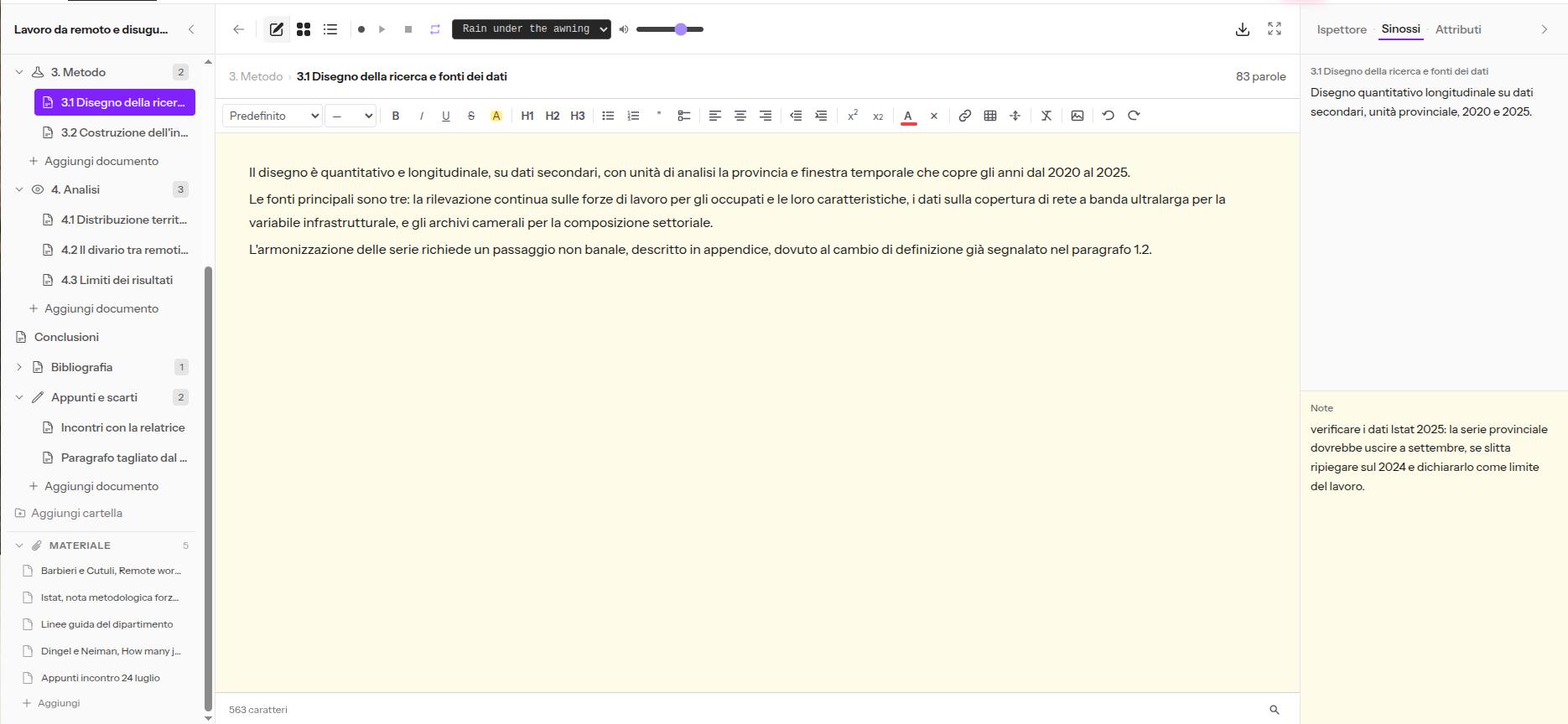
GrinTale is useful in the phase that comes before, which lasts much longer: building your dissertation and holding it together for months. It works as a workspace around your text, in the browser.
The Binder holds the dissertation tree: one folder per chapter, one document per section, reordered by dragging. Moving 3.2 into chapter 4 is a drag, not a cut and paste.
The Inspector keeps a synopsis, a status (draft, in review, done) and notes for each section, separate from the text.
The Corkboard and the Outliner show all sections side by side with their word counts: you can see at once if a chapter is out of proportion.
The Material section keeps article PDFs, images and data files inside the project.
Snapshots save a version of a section before you apply your supervisor's comments, and let you go back.
DOCX export takes your text into Word when it is time to format. If you have already started in Word or Google Docs (via a .docx file), the import recognises your chapters and splits them into separate documents, as explained in the guide on importing from Google Docs.
You can try it free for 15 days, no card required. For the full method, from structure to table of contents, see the guide on how to structure a dissertation.
Why do you need Zotero whatever you choose?
Because references are the part of a dissertation that wastes the most time, and no writing program handles them well on its own.
Zotero is free and open source, developed by a nonprofit organisation (Zotero). It saves sources while you research, with one click from the browser, keeps PDFs and notes together, and inserts citations and a reference list into your document in the style you need, including Harvard, OSCOLA and other footnote styles. It has plugins for Microsoft Word, LibreOffice and Google Docs (Zotero, word processor integration). Syncing between devices is free up to 300 MB (Zotero Storage), which is plenty for the references of a whole dissertation. Storing many attached PDFs needs a paid plan, or you keep the files locally.
Start using it on day one and your reference list is done when the dissertation is. Start using it in the final month and you will be typing in eighty sources all over again.
How to choose at a glance
Cost: LibreOffice, Google Docs, Zotero and LaTeX are free · Word free for many students through their university · Overleaf free with limits, Student €87 a year · Scrivener one time licence · GrinTale €29 a year.
Footnotes: Word, LibreOffice, Google Docs, LaTeX, Scrivener yes · GrinTale no.
References: Zotero with Word, LibreOffice or Google Docs · BibTeX with LaTeX · Word's and Google Docs' built in tools for simple dissertations.
Equations: LaTeX clearly ahead · Word and LibreOffice fine for occasional use.
Working with your supervisor: Google Docs for live comments · Word for tracked changes · paid Overleaf for several collaborators.
Organising a long dissertation: Scrivener and GrinTale · Word and Google Docs become awkward to reorganise when the dissertation is one very long file.
Final formatting to university rules: Word or LibreOffice for most dissertations · LaTeX for STEM.
Which combination should you choose for your field?
Two well chosen tools beat one tool used for everything. These combinations work in most cases:
Humanities and law (many footnotes, many sources): Word or LibreOffice plus Zotero, set to your department's referencing style. If the dissertation runs long, draft the chapters in Scrivener or GrinTale and bring everything into Word for formatting.
Engineering, maths, physics, computer science: LaTeX on Overleaf, with references in BibTeX. Zotero can export your sources as BibTeX, so you do not have to type them by hand.
Business, social sciences, psychology (APA or Harvard, tables and charts): Word plus Zotero. Google Docs is a good alternative if your supervisor prefers to comment online.
Short undergraduate dissertation (8,000 to 12,000 words): Word or Google Docs alone can be enough, with the built in citation tool. Add Zotero once your sources run past a few dozen.
Long master's thesis or PhD: one tool to organise (Scrivener or GrinTale), one for references (Zotero), one for final formatting (Word or LaTeX).
Whatever you choose, read your department's handbook and ask your supervisor before you start. If the department provides a Word template or a LaTeX class, the last step is already decided for you.
Frequently asked questions
Can you write a whole dissertation in Google Docs?
Yes, especially if your supervisor comments online. For the final version, export to .docx and check the formatting in Word or LibreOffice. For Harvard or footnote styles use Zotero, because the built in tool does not support them.
Is Microsoft Word free for students?
Often, yes. Microsoft offers the web version free to students at eligible institutions, and many universities provide the full Microsoft 365 licence. Check your university's IT services page before buying.
Do I have to use LaTeX?
No, unless your department or supervisor requires it. It pays off if your dissertation has many equations. For a mostly text dissertation, Word or LibreOffice is quicker.
Do I need a reference manager for an undergraduate dissertation?
With fewer than 20 or 30 sources you can manage by hand, or with Word's built in tool. Beyond that, Zotero saves days, especially in the final week.
How do I move between programs without losing formatting?
Use heading styles from the start instead of formatting headings by hand. Export to .docx, the most compatible format, and do the final formatting only once, in the program you will submit from.
In summary
For most dissertations the combination that works is Word or LibreOffice to write and format, plus Zotero for references. LaTeX on Overleaf is the choice for dissertations with equations. Google Docs is ideal for working with your supervisor, less so for the final version. Scrivener and GrinTale help when the dissertation is long and needs to be built and organised for months before it is formatted.
Choose before you start, and stay with that choice until submission: switching programs halfway through costs more than any limit of the wrong program.
Sources
Microsoft, Office 365 Education, retrieved 2026-10-12, https://www.microsoft.com/en-us/education/products/office
Microsoft, Create a bibliography, citations, and references, retrieved 2026-10-12, https://support.microsoft.com/en-us/office/create-a-bibliography-citations-and-references-17686589-4824-4940-9c69-342c289fa2a5
The Document Foundation, LibreOffice, retrieved 2026-10-12, https://www.libreoffice.org/discover/libreoffice/
Google, Add citations and a bibliography in Google Docs, retrieved 2026-10-12, https://support.google.com/docs/answer/10090962
Overleaf, Plans and pricing, retrieved 2026-10-12, https://www.overleaf.com/user/subscription/plans
Literature & Latte, Scrivener store, retrieved 2026-10-12, https://www.literatureandlatte.com/store/scrivener
Zotero, retrieved 2026-10-12, https://www.zotero.org/
Zotero, Word processor integration, retrieved 2026-10-12, https://www.zotero.org/support/word_processor_integration
Zotero, Storage, retrieved 2026-10-12, https://www.zotero.org/storage
Pronto a scrivere il tuo prossimo capolavoro?
15 giorni gratis, nessuna carta richiesta.